By Benjamin Leiva, Ana T. Ribeiro, Chris Agnew, and Susanna Loeb
This is the second of a series of research briefs aimed at understanding how people use AI-powered educational tools.
Since the launch of commercially available generative AI, the most common engagement platform is through chat. For all the appeal and flexibility of using natural language to interact with these AI models, it is not always easy to get them to generate the desired output from a question or request. For this reason, several Edtech platforms have designed custom fine-tuned AI assistants to cater to educator needs; yet, we know little about how educators are using these chat-based interfaces.1 This brief analyzes the content of thousands of teacher-chatbot interactions from a leading EdTech platform. We highlight two key findings:
- Most teachers use the single multi-purpose chatbot for all of their interactions, instead of using multiple AI assistants for different and specific purposes.
- The most common use of AI assistants for teachers was seeking information related to curriculum and content (e.g., asking for an explanation on a detail about the American Civil War or about Algebra I standards for their state).
As AI tools move from experimentation to routine use in schools, understanding what teachers ask these systems and how they use them becomes essential for both tool design and education policy.
The Data
We partnered with SchoolAI, an AI-powered educational platform designed to support K-12 learning, higher education, and career and technical education (CTE). This analysis draws on data from over 150,000 prompts written by more than 4,400 teachers across over 15,000 chat threads in October in 2024. Only de-identified records were shared with us - no PII was provided in the chats or elsewhere in the dataset. To focus on sustained platform use rather than exploratory first-day behavior, we restrict our sample to teacher accounts with activity on more than one day and at least one interaction with a chat-based AI assistant.
We use three terms to describe levels of interaction. A prompt is a single message. A conversation is a topic-specific exchange comprising multiple prompts and responses. A thread is a discrete chat tab that may contain multiple conversations. Because the dataset lacks message-level timestamps, identifying distinct conversations within a thread involves some judgment.
To make sense of teacher chat conversations, we use prior work on human-AI interactions and established teacher evaluation frameworks to classify teachers’ prompts by intent and topic.2 Given the time and compute-intensive nature of analyzing each individual message and its preceding context, we use a sampling approach to select a semantically representative dataset of 15,000+ threads started by 4,300+ teachers, across all available assistants for the period covered by this analysis.3
The dataset includes teachers’ interactions with ten AI assistants on SchoolAI. These chat assistants include Coteacher, the only multi-purpose chatbot designed to support a variety of tasks4, and nine other domain-specific AI assistants fine-tuned for use cases like Essay Grading Assistant and Curriculum Coach. Figure 1 shows how these AI assistants are presented to teachers and the individual chatbot user interface, respectively.
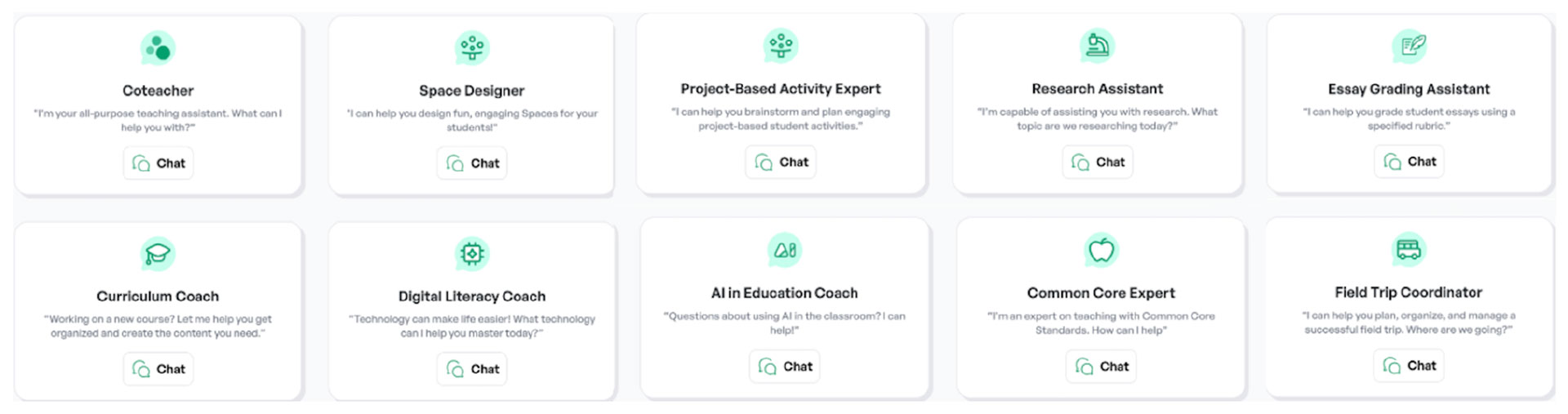
Panel A: Available Assistants
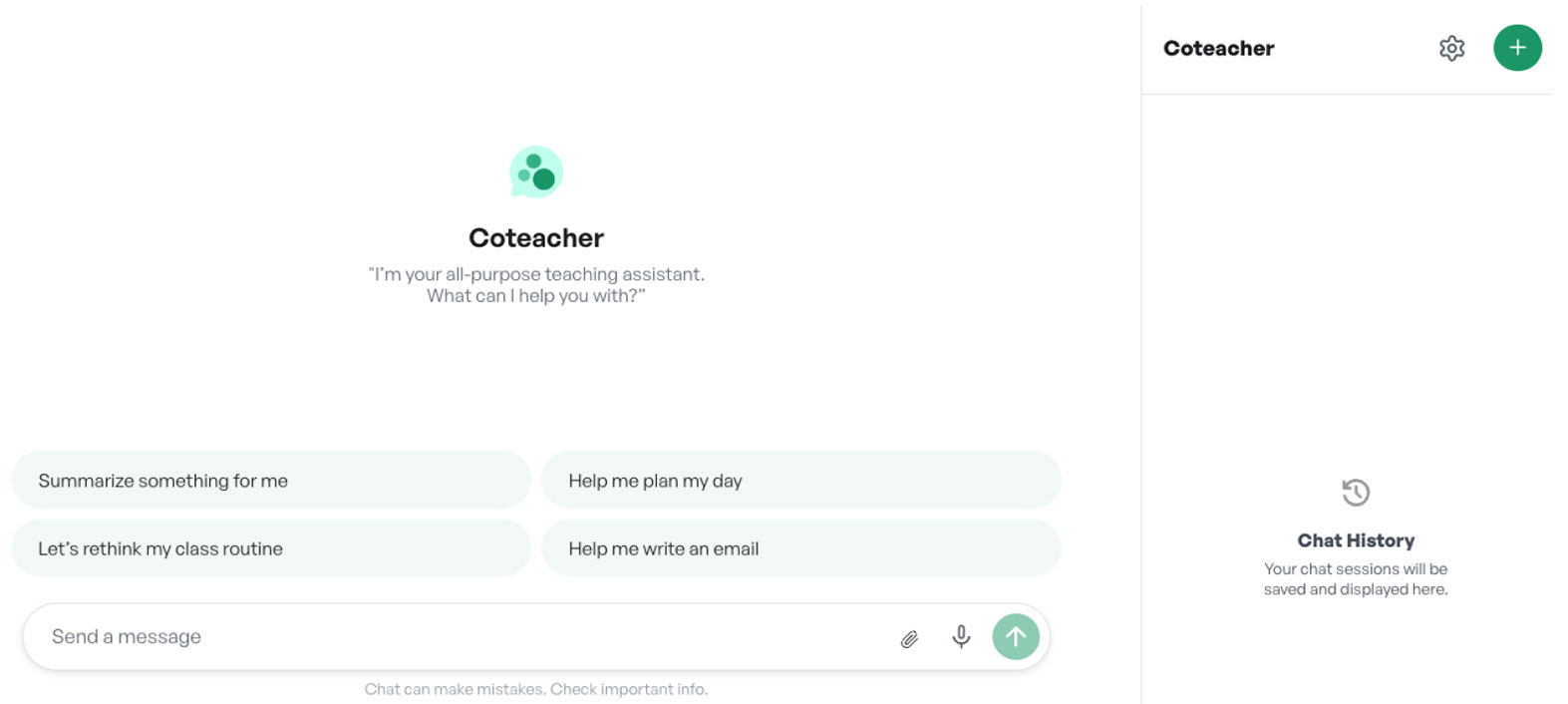
Panel B: User Interface
Figure 1: Set of SchoolAI assistants and user interface
Notes: When choosing an assistant, teachers can start new conversations by clicking on the green ‘+’ button (Panel B, top-right).
Analyzing Human-AI Interactions
Our analysis explores early educator use of SchoolAI chat-based AI assistants through two means:
- Documentation of both multi-purpose and domain-specific use of AI assistants
- Leveraging traditional natural language processing (NLP) and LLM-based methods to make meaning of prompt content
Chat-based user interfaces are creating an explosion of human-AI interaction data, yet interpreting it rigorously at scale is challenging. AI assistants are more accessible to educators because of the flexibility to write prompts in plain language. It’s also this lack of a predictable writing structure that makes it difficult to sort messages into neat categories of use. Different users, or even the same user at different times, can submit prompts for a similar desired output that can range from a single sentence to several paragraphs long (adding context and examples), with entirely distinct syntax and vocabulary (technical terms or simpler words) that convey the same meaning. Additionally, it is difficult to measure proxies for user value: engaging in multiple rounds of prompts or stopping after the first response might both be signs for success or frustration.
Compounding these challenges, this dataset lacks message-level timestamps making it harder to identify separate conversations (groups of messages) within a chat thread and preventing us from distinguishing single-day (all prompts concentrated in one day) from multi-day threads. This limitation is especially important given the wide variation in how teachers use text interfaces: after choosing an AI assistant, teachers can either keep all interactions within the initially created chat thread, or teachers can start a new thread for a new topic with a blank prompt-and-response history.5
What We Set Out To Learn
- Use: How much do teachers use each of the AI assistants? How many messages do teachers exchange with each of the AI assistants? How many of the AI assistants do teachers tend to use?
- Content: What do teachers ask about? What are the overall topics or use cases that surface from their prompts? How does content vary across the ten AI assistants?
Finding #1: Teachers overwhelmingly rely on the multi-purpose chatbot
Teachers overwhelmingly rely on a single chatbot rather than experimenting across tools. Among teachers who started more than one thread, 84% used only one chatbot across all their interactions. Even among heavier users—those who initiated four or more threads—58% relied exclusively on the general-purpose assistant, Coteacher.
Across the 4,422 teachers in our sample, we observed 15,643 chat threads in October 2024. Usage varied widely: 42% of teachers started only one thread, 22% started five or more, and fewer than 2% started more than 20.
More than two-thirds of teachers began their first recorded thread in October 2024 with the multi-purpose assistant, Coteacher (Figure 2). Switching between tools was uncommon: only 13% used two different AI assistants and just 3% used three or more.
Even conditional on higher levels of use, reliance on Coteacher remains dominant. Among teachers with two or three threads, 61% used Coteacher exclusively, and only 16% used both multi-purpose and domain-specific AI assistants. Among teachers with four or more threads, 58% used Coteacher exclusively and 27.7% used both (Figure 3)
Within AI assistants (Figure 4), Coteacher—the default multi-purpose assistant—is the only chatbot for which most users started more than one thread. Almost a quarter, 22%, of Coteacher users initiated more than five threads during the month. On the other hand, domain-specific AI assistants display a “one-and-done” pattern, where most users only started a single thread. A few assistants - Research Assistant, AI in Education Coach, and Essay Grading Assistant - show higher shares of teachers creating multiple threads, with all three having over 20% of their users initiating three or more chat threads. Interpreting their use requires caution as domain-specific assistants have a much smaller user base than Coteacher (3,300+ teachers) and are likely to attract different teacher profiles based on their purpose.
Although most teachers interacted with a single type of assistant (multi-purpose or specific) and initiated only one or two chat threads, these threads varied in length. We plot the distribution of over 150,000 teacher prompts within each chat thread across all available assistants, as shown in Figure 5. This boxplot reveals that the majority of teachers submitted fewer than 10 prompts per thread across almost all the AI assistants. This suggests that most exchanges are brief and involve few iterations. However, all AI assistants presented a group of outliers, a small number of threads in which teachers submitted dozens or even hundreds of prompts, suggesting more prolonged and sustained exchanges.
The multi-purpose chatbot—used at least once by 74% of teachers across 11,500 chat threads—placed among the assistants with the lightest exchanges: its average and median teacher-message counts were both lower than those of six of the ten domain-specific assistants. While these fine-tuned AI assistants are considerably less popular among users (not one specialized assistant had use by more than 12% of teachers), their specific purpose can directly affect the length of the typical thread. The Essay Grading Assistant stands as the most extreme example, with a median number of messages of 10, which can be explained by teachers submitting multiple prompts (at least one per student) for each assignment they wish this AI assistant to grade.
Three key patterns emerge from these teacher-chatbot interactions. First, teachers tend to rely on a single type of assistant. Second, most teachers engage lightly with the platform, as half initiated just one or two chat threads during our period of analysis. Third, within these threads, most exchanges remained brief—the median thread across assistants contained fewer than 10 teacher prompts—though some outlier threads involved dozens or even hundreds of messages, suggesting more sustained pedagogical work. Beyond documenting how often teachers use these assistants, we can understand what they are asking.
Finding #2: Curriculum and content dominate teacher-AI interactions
Most teacher prompts ask the AI assistant to create something. Just over half of all messages were classified as “Doing,” meaning teachers requested that the AI generate lesson plans, assessments, feedback, or other materials. Curriculum and content dominate these interactions: roughly two out of every five messages relate to what to teach or how to align materials with standards.
To classify prompts by intent and topic, we draw on frameworks from Chatterji et al. (2025) and Liu et al. (2025), sorting messages into three intent categories (Asking, Doing, Expressing) and six pedagogical domains (Instructional Practices, Assessment and Feedback, Student Needs and Context, Professional Responsibilities, Curriculum and Content Focus, and Other).6 Examples of these intent-domain combinations can be found in Appendix Table A.1.
We used a few-shot prompting strategy with Gemini 2.5 Flash (incorporating LearnLM), providing human-labeled examples and up to 10 prior messages of context. The model returned a classification, confidence score, and justification.
As shown in Figure 6, just over half of teacher prompts were classified as “Doing.” The remainder were split between “Asking” (31%)—seeking information or advice—and “Expressing” (15%)—sharing thoughts without requesting action. To illustrate what these intent categories look like in practice, Table 1 provides a few representative (anonymized) teacher prompts for each.
Table 1: Teacher Prompt Examples, by Intent | |||
| Intent | Example #1 | Example #2 | Example #3 |
| Asking | What are good ways to help students understand/decipher AP history style multiple choice questions? | Congress’ power is outlined in article I of the constitution. True or False? | What is a cotton broker? How did a cotton broker make money? |
| Doing | Can you write a paragraph about chapters 2-4 of The Hobbit using 8 of those words? | I'm looking for a good lesson on introducing the french revolution. | Explain what privatization is in terms of post Soviet Union Russia in the 1990s. Explain to a group of 10th graders. |
| Expressing | I struggle with grammar and vocabulary. | I am feeling a little upset about her response, and feel it was a little defensive. | No behavior problems from her. She is amazing and such an example to her classmates. |
| Notes: Examples come from a stratified random sample across AI assistant types and intent categories. The selected prompts are illustrative of real-world teacher requests. | |||
While Chatterji et al. (2025) find that about half of general ChatGPT users primarily “Ask” for information, the SchoolAI data show teachers more often use AI to “Do” something. This likely reflects SchoolAI’s positioning as a professional tool. The share of “Expressing” prompts (15%) is similar to that observed among general ChatGPT users (13.8%).
Curriculum and Content Focus emerges as the predominant topic: roughly two out of every five messages relate to what to teach, how to represent content, or how to align materials with standards (Figure 7). This finding is consistent with the idea of AI assistants as “curriculum co-planners”, helping teachers unpack standards, generate examples, and revise tasks so they are more accessible to students. Assessment and Feedback, Instructional Practices, and Other each account for 11–17%, suggesting teachers also use AI for grading support and concrete classroom moves.
Taken together, the distribution of prompts across these topics suggests that teachers are using AI assistants for more than just co-planning basic teaching tasks. Teacher messages categorized under “Student Needs and Context” show adaptation for diverse learners, such as modifying tasks for English learners, students with IEPs, or classes with wide skill spreads. Prompts in “Assessment and Feedback” reflect both the workload associated with grading and helping students improve their performance. Teachers are asking how to design quick checks for understanding, interpret student work, or give more actionable feedback without writing paragraphs on every paper. “Instructional Practices” messages link content and assessment to specific classroom actions, such as discussion techniques, grouping strategies, or ways to check understanding in real time.
We combine intent and topic into a single view in Figure 8. While most messages are classified as “Doing,” the single largest intent–domain combination is teachers asking for information about curriculum and content (see Appendix Table A.1). The six next most common teacher prompts are in the “Asking” category with the top three being “Doing”/curriculum and content (create a lesson plan, etc.), “Doing”/assessment and feedback (provide feedback on student work, create a quiz, etc.), and “Doing”/instructional practices (create an activity, etc.).
By contrast, AI as administrative support for doing things such as drafting parent emails (“Doing”/professional responsibilities) just barely makes the top five at 6.2% of teacher prompts. Building supports for individual students (“Doing”/student needs and context), as a resource for school policies (“Asking”/professional responsibilities), or to reflect on personal teaching practice (“Expressing”/instructional practice) do not make the top five. It’s worth noting that since these data reflect October usage, timing may be a factor in which prompt types appear most often, and we should be cautious about generalizing across the full school year.
While individual messages are identified by topic, topics shift over the course of a conversation. Figure 9 visualizes the probability that a teacher moves from one topic to another within the same chat. Much like the daily practice of a teacher, content, instruction, assessment, student needs, and professional responsibilities are interwoven in a single interaction. A conversation might begin with a content-aligned request (“Help me design an activity to introduce this standard”), shift toward student needs (“How can I adapt this for students who are reading below grade level?”), and conclude with a professional task (“Draft an email to families explaining this new assignment”).
The regularity of cross-domain shifts suggests teachers are using SchoolAI chat tools across multiple layers of their work. The transition analysis highlights a curriculum- and content-centric workflow: four of the five most common cross-topic transitions lead into Curriculum and Content Focus at least 25% of the time. The most likely transition is teachers beginning with an instructional practice focus and transitioning to curriculum and content (a teacher shifting from how to engage a class to the concrete substance they are teaching). For teachers focusing on assessment and feedback, 45.5% of the time they will transition to a curriculum and content focus (possibly a teacher building an assessment and then circling back to curriculum and content to ensure alignment). Fourth most common is teachers beginning with curriculum and content and then shifting to instructional practice 34% of the time (the classic lesson planning flow - what to teach and then how to teach it).
These patterns suggest teachers are not simply requesting isolated materials. Instead, they move fluidly across curriculum, instruction, assessment, and student needs within a single conversation. More than half of messages are driven by creation needs (“Doing”) but a substantial share involve seeking information (particularly around curriculum and content). In practice, this means that AI assistants are functioning simultaneously as reference tools and drafting partners within the same conversation.
These patterns also have implications for how AI is designed and deployed in K–12 settings. The prominence of content- and curriculum-related prompts (both in “Asking” and “Doing”) suggests that high-quality, standards-aligned knowledge and materials are even more important. If the underlying content is shallow or misaligned, the assistance teachers receive will be as well. The prevalence of “Doing” prompts for assessment and feedback underscores the importance of accountability and transparency—clear school policies on AI for formative/summative assessment, ensuring human review, and ensuring AI is not disadvantageous to specific students.
Conclusion and Next Steps
Most teachers rely on a single multi-purpose assistant, and their prompts primarily request the creation of materials, particularly around curriculum and content. On one hand, even relatively light or sporadic use may help teachers better align to standards and access high-quality instructional materials. Within the most-used Coteacher chatbot, 22% of teachers initiated more than five threads in a month, with the median thread containing between 2 and 7 prompts. On the other hand, most teachers started only one thread with one chatbot in the month, suggesting limited sustained or strategic integration of AI into practice.
These findings have several implications for both practitioners, researchers, and developers:
- For practitioners, given the centrality of curriculum and content in chatbot use, teachers would benefit from understanding the difference between high-quality instructional materials (HQIM) and general information, and from learning prompting strategies that ground responses in HQIM.
- For researchers, an important need is research-backed and validated measures from chat data for both student academic learning and metacognition. A clear next step from this landscape-mapping work is to examine how usage varies across contexts (school, subject, and student/teacher characteristics) and to conduct causal research on the impact of chat tool use by both teachers and students.
- For developers, teachers' reliance on a single multi-purpose assistant and fluid cross-domain transitions suggest they need streamlined interfaces that support multifaceted goals without navigating between specialized tools. Since this dataset was collected, SchoolAI has implemented enhanced Spaces that allow teachers to leverage AI assistance across multiple functions within a unified workflow, aligned with the usage patterns reported here. Further research is needed to evaluate whether such integrated environments improve the depth and quality of teacher-AI interactions.
References and Appendix
References
Chatterji, A., Cunningham, T., Deming, D. J., Hitzig, Z., Ong, C., Shan, C. Y., & Wadman, K. (2025). How people use chatgpt (No. w34255). National Bureau of Economic Research.
Liu, A., Esbenshade, L., Sarkar, S., Tian, V., Zhang, Z., He, K., & Sun, M. (2025). How K-12 Educators Use AI: LLM-Assisted Qualitative Analysis at Scale. arXiv preprint arXiv:2507.17985.
Tech specs for users in sample
SchoolAI ran a network of AI agents that routed each task to the most suitable model. In practice, they drew on multiple foundation-model suites available as of October 2024—OpenAI (e.g., GPT-4o and o1), Anthropic (e.g., Claude Sonnet 3.5, Claude Opus/Sonnet/Haiku 3), and Google (e.g., Gemini 1.5 Pro/Flash).
Appendix
Table A.1: Prompt Classification Framework | |||
| Domain \ Intent | Asking | Doing | Expressing |
| Instructional Practices | Teacher asks for advice or explanations about how to teach, such as effective strategies, discussion techniques, or ways to check understanding. | Teacher asks the AI to carry out an instructional task, such as designing an activity, rewriting directions, or modeling an explanation. | Teacher shares reflections or feelings about their instruction, such as frustration with a lesson or pride in how an activity went. |
| Curriculum and Content Focus | Teacher asks for information or explanations about content and standards, including how to explain concepts or align instruction. | Teacher asks the AI to generate or adapt content-aligned materials, such as problems, texts, or lesson outlines tied to standards. | Teacher reflects on content choices or alignment, expressing concerns or satisfaction about texts, tasks, or rigor in a unit. |
| Assessment and Feedback | Teacher asks for guidance on assessment practice, such as designing checks for understanding, interpreting student work, or improving rubrics. | Teacher asks the AI to create assessments or feedback (quizzes, rubrics) or to grade student work. | Teacher reflects on their assessment and feedback practices, including workload, consistency, or whether feedback is helping students. |
| Student Needs and Context | Teacher asks how to support particular students or classroom situations, including differentiation, engagement, and behavior or inclusion challenges. | Teacher asks the AI to tailor materials or strategies to specific learners or contexts, such as ELLs, IEPs, behavior needs, or low-resource settings. | Teacher expresses concerns or observations about specific students or classroom climate, such as participation, motivation, or social dynamics. |
| Professional Responsibilities | Teacher asks how to handle professional tasks and norms, such as structuring conferences, collaborating with colleagues, or preparing for meetings. | Teacher asks the AI to produce professional artifacts, like emails to families, meeting notes, or reflection summaries. | Teacher reflects on their broader professional role, workload, wellbeing, or growth, including burnout, goals, and aspirations. |
| Other | Teacher asks general questions not clearly linked to professional domains, including how the tool works or miscellaneous curiosity questions. | Teacher asks the AI to perform tasks not clearly tied to teaching domains, like formatting text, drafting generic content, or troubleshooting. | Teacher expresses general thoughts or emotions not clearly mapped to other domains, such as being tired, curious about AI, or simply chatting. |
1. Examples of these education-focused initiatives include Anthropic’s Claude for Education, Google’s Gemini for Education, and OpenAI’s ChatGPT Edu (Anthropic 2025, Google 2025, OpenAI 2024).
2. The built-upon research comes from education and general-public settings and use cases (Liu et al. 2025, Chatterji et al. 2025, Handa et al. 2025, Phang et al. 2025, Elondou et al. 2024).
3. Stratified by AI assistant and conversation length quintiles to preserve population distributions, with each teacher limited to a maximum of 2 conversations to prevent overrepresentation of highly active users.
4. SchoolAI has since introduced Dot, a multi-purpose teacher support chatbot.
5. The practice of creating new conversations has pros and cons for the user and the underlying LLM. On the plus side, it allows users to compartmentalize their queries, making it easier to find on-topic previous interactions, compared to having a single long thread to go over. This also helps models with small context windows or reasoning capabilities to consider relevant-only information for their responses. On the downside, this practice adds more time and cognitive load to the user, as well as making it harder for legacy LLMs to understand their user’s historical nuances. However, with the current pace of AI improvements, conversation-splitting becomes less needed everyday.
6. As defined by Chatterji et al. (2025) and Liu et al. (2025), respectively.